Your wealth, in your palm.
One pull to refresh — stocks across TW / US / JP / HK / VN, crypto, funds and precious metals flow in together, with cross-currency net worth updated live.
And every detail of your assets stays only on your iPhone.
Every feature, crystal clear
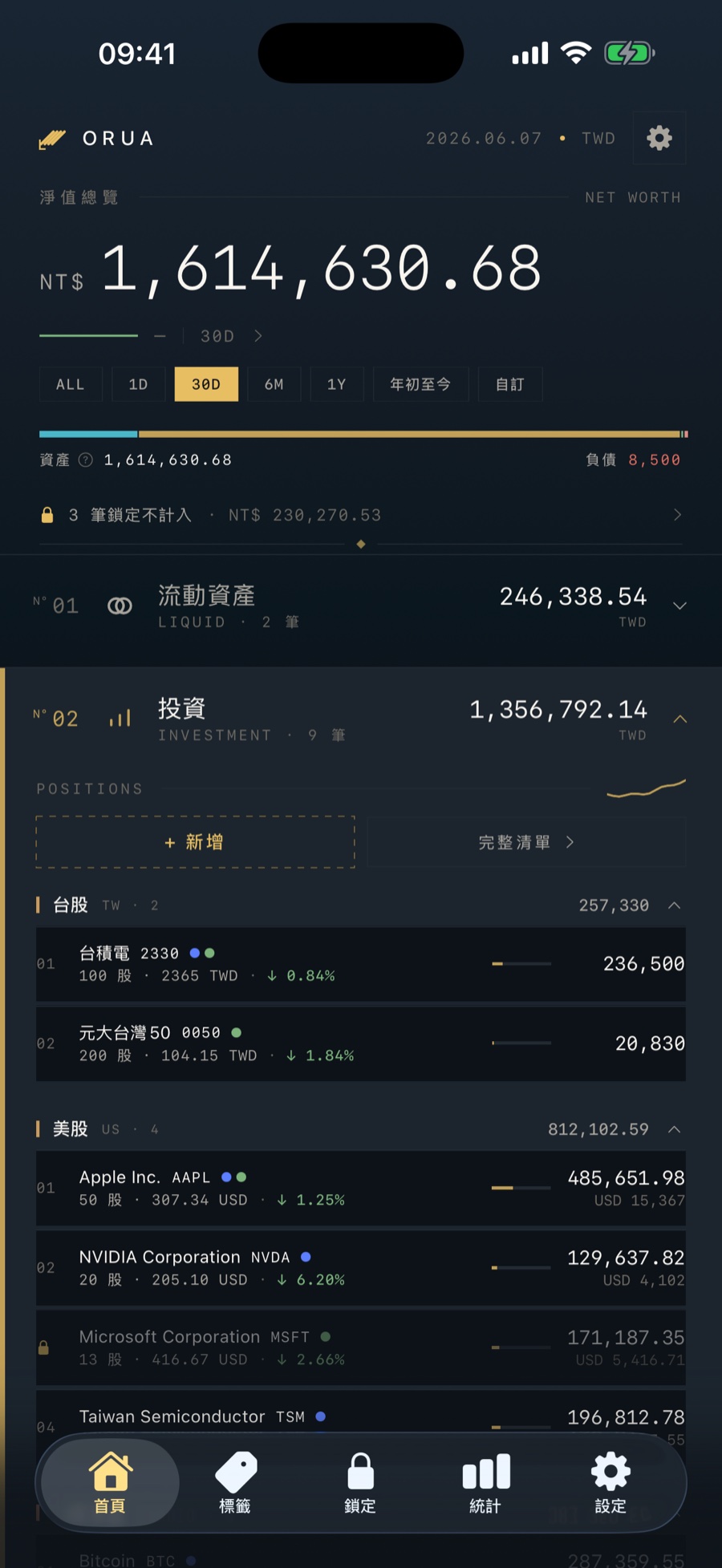
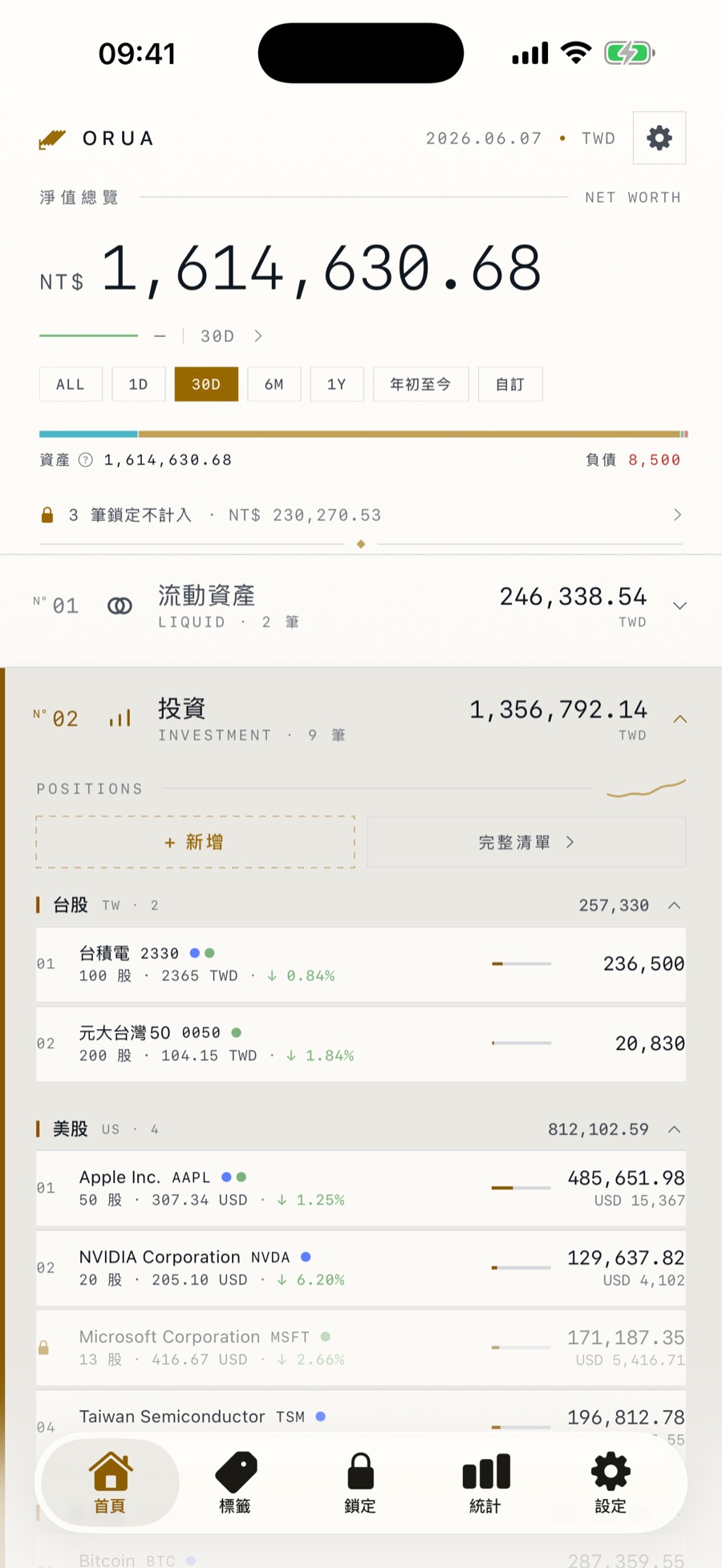
Your whole net worth, in a single screen
A big net-worth figure, the percentage change, a small trend chart, and one-tap periods 1D / 7D / 30D / 90D / 1Y / ALL. Liquid, investments, fixed, receivables and liabilities grouped into five categories you can expand and collapse — this is what sets Orua apart from a stocks-only app.
- ▸Net worth across five asset categories
- ▸Net-worth trend + multiple periods
- ▸Live cross-currency totals
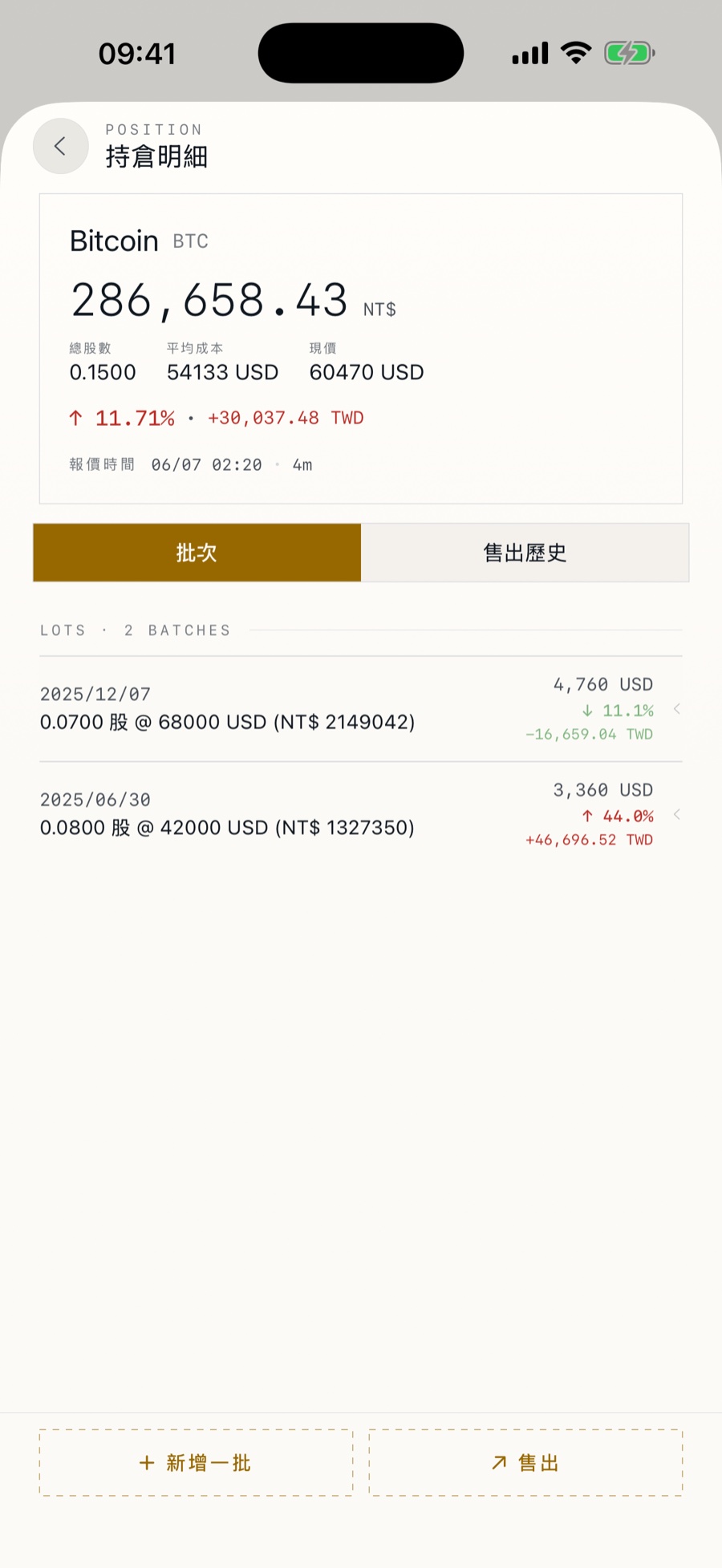
Every buy keeps its own trail
Buy the same stock in batches — each lot's date, price, note and tags are stored separately. Weighted average is computed for you, and you can trace back every decision.
- ▸Record the same stock in batches
- ▸Weighted average updates automatically
- ▸Edit each lot independently
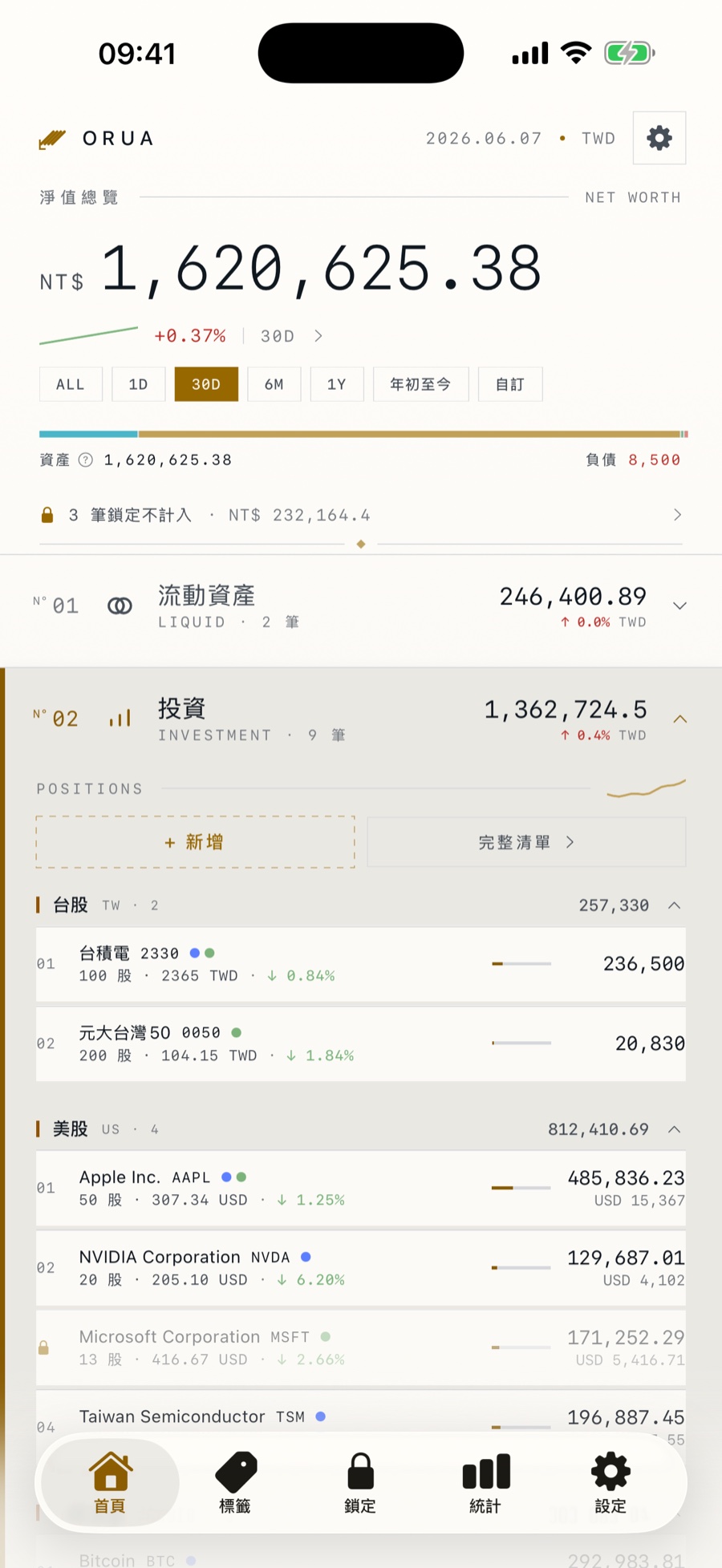
One pull, live across markets
TW / US / JP / HK / VN stocks, crypto, funds and precious metals — grouped automatically by asset type and market, each showing live P/L percentage and quote time. Multiple free sources aggregated on the backend.
- ▸Covers eight market categories
- ▸Multiple sources, auto-aggregated
- ▸Pull to refresh + smart throttling
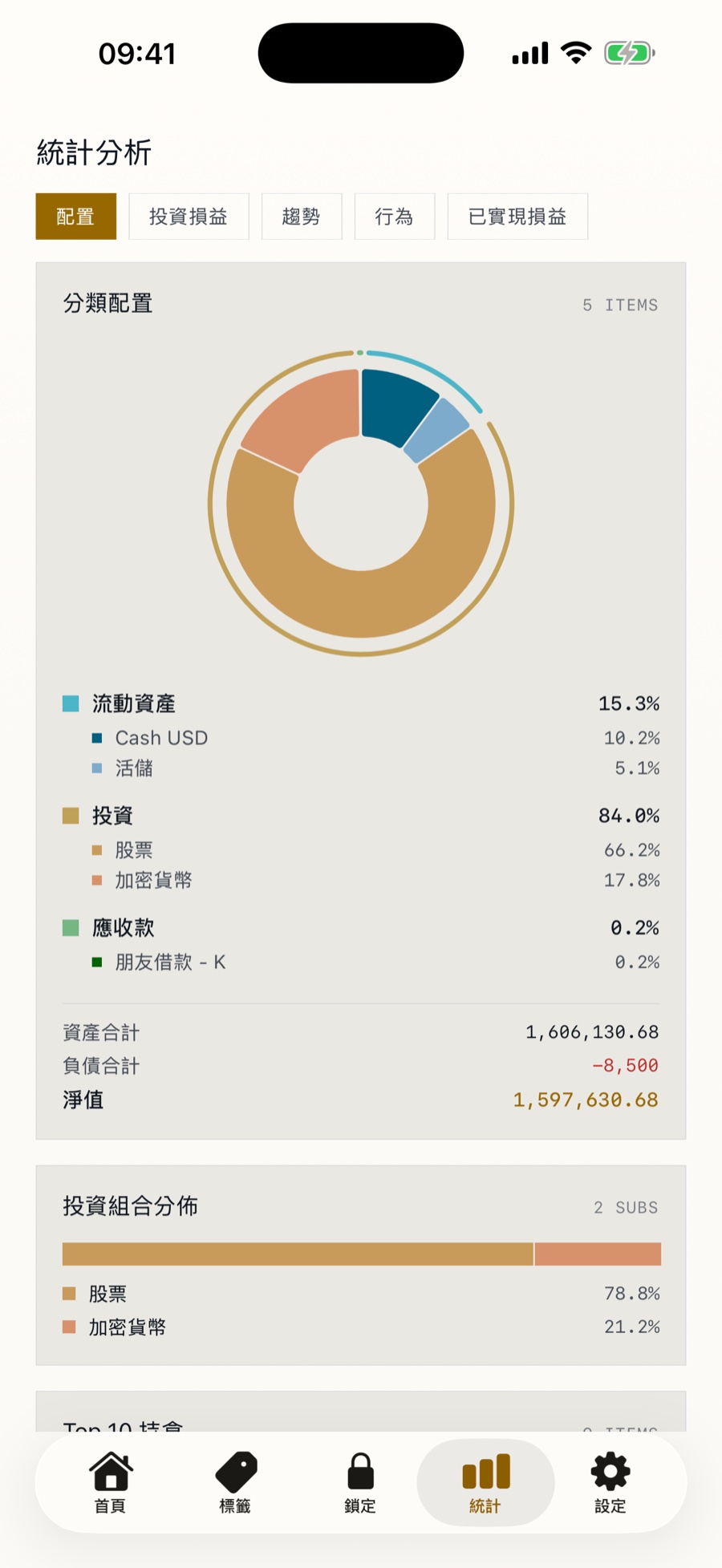
Asset mix, weights at a glance
A category-allocation donut and a portfolio distribution bar make every slice and every market weight clear. Switch between P/L, realized gains and annualized return (XIRR) — completely free, no subscription.
- ▸Category / sub-category allocation
- ▸Portfolio distribution, visualized
- ▸Multi-view P/L analysis
Two interface styles, to fit your habits
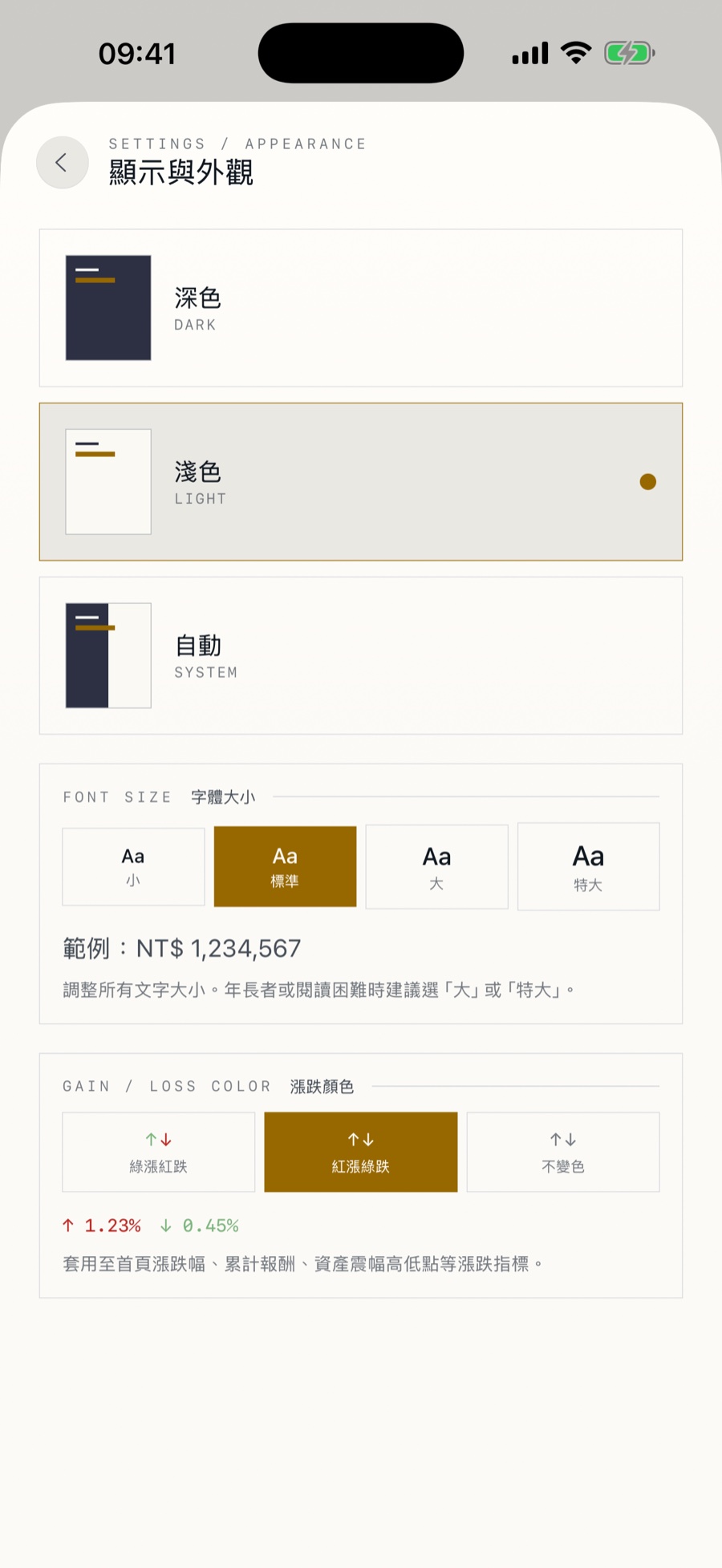
Minimal mode for single-page focus, Classic mode with an iOS 26 Liquid Glass tabbed interface in a custom order. Dark / light / follow-system themes, four text sizes, and a built-in 7-language interface — changes take effect instantly.
- ▸Instant Minimal / Classic switch
- ▸Three themes + four text sizes
- ▸TW / CN / EN / JA / FR / VI / Cantonese
And these too, just right
Two-level tags
16 color swatches; tag a whole holding or a single lot, group totals aggregate instantly.
Two-level lock
Lock a whole holding or one lot out of your total — the record is kept in full.
Multi-currency cost
19 currencies; each lot seals the FX rate at purchase, so cross-currency P/L is accurate.
7 languages
TW / CN / EN / JA / FR / VI / Cantonese, built in, no cloud.
iCloud auto-sync
Syncs across devices through your own iCloud, still never through our backend.
Export & backup
Full JSON backup you can re-import; CSV for Excel / taxes.
Privacy mode
One tap to mask every amount as •••• in public.
Zero tracking
No analytics, no cookies — the same promise as the app.
Core features are free,
Premium unlocks everything
Full tracking, five categories and statistics are all free. Premium unlocks unlimited items plus auto quote refresh and live FX.
- ▸Unlimited items
- ▸Auto quote refresh
- ▸Live FX conversion
- ▸All Monthly plan features
- ▸7-day free trial first
- ▸Best long-term value
- ▸Pay once, unlock forever
- ▸No more renewal nags
- ▸Support an indie developer
Free tier caps the five categories at 5 items total · auto-converted to local currency in 175 regions
The backend only gives quotes,
the rest is all yours
Holdings, lots, history and settings all stay on your iPhone. The backend only sees an anonymous device ID and the symbols you look up. The only thing sent out is a price lookup — your asset details never leave your phone.
📱 Your iPhone
Holdings / lots / history / settings all stored locally
⚙️ Orua backend
Only aggregates quotes and returns prices — never stores your assets
🌐 Public quote sources
Free data from exchanges / Yahoo / CoinGecko, etc.
Frequently asked
Is my data really not uploaded to the backend?+
Yes. Holdings / lots / net-worth history / category settings all live only on your iPhone. The backend only sees an anonymous device ID plus the symbols and markets you query. The only thing sent out is a price lookup — never your holdings or amounts.
Is it paid? What are the free-tier limits?+
Full tracking, five categories and statistics are all free. The free tier caps the five categories at 5 items total and limits auto quote refresh. Premium ($1.99/mo, $11.99/yr with a 7-day trial, or $39.99 lifetime) unlocks unlimited items, auto quote refresh and live FX.
Can I sync to an iPad / another iPhone?+
Yes. Turn on iCloud auto-sync to sync across devices through your own iCloud — still never through our backend. Manual export / import backups are kept too.
Are the quotes accurate? How delayed?+
Stock quotes come from public sources like TWSE, Yahoo and Stooq, usually delayed 15–20 minutes (as required). Crypto comes from CoinGecko and Binance, nearly real time. Quotes are for record-keeping only — don't use them for trading decisions.
Is my data still there after reinstalling?+
If iCloud sync is on, it restores automatically after reinstalling. Otherwise iOS clears local data when you delete an app, so export regularly via Settings → Data Backup to iCloud Drive.
Ready to build your own vault?
No account, no password. Download, open, start tracking. Free to start, upgrade to Premium anytime.
Download on the App Store